
Enhanced Product Descriptions for Shopify- How to Add Them
Enhanced Product Descriptions for Shopify | Prodiify MediaXL
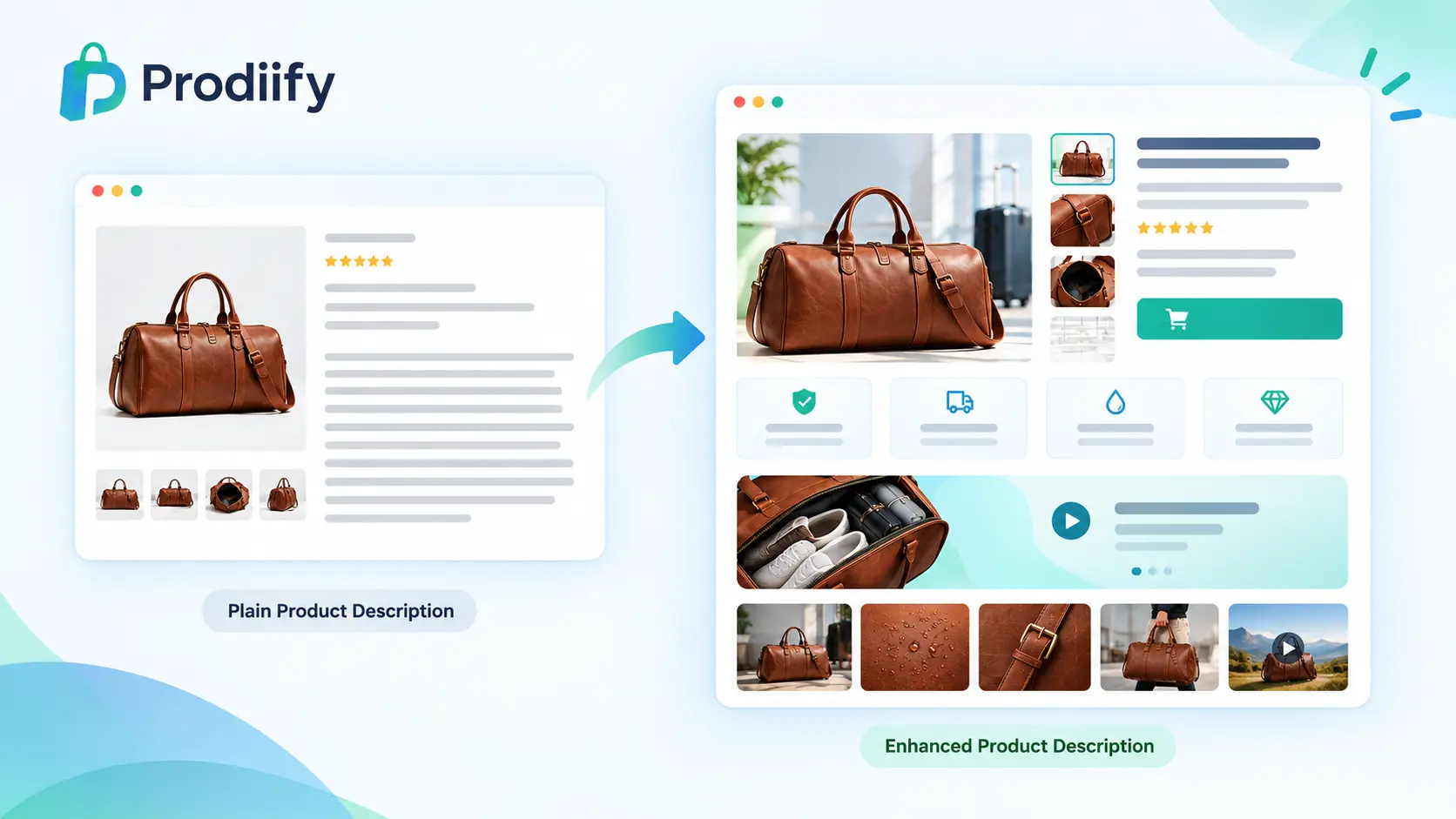
If you’ve compared your product pages to a competitor’s and felt like theirs looked more “finished,” the difference usually comes down to one thing: an enhanced product descriptions versus a plain one. Here’s what an enhanced product descriptions actually is, why it outperforms a standard block of text, and how to add one to your Shopify store without hiring a developer.
What Is an Enhanced Product Description?
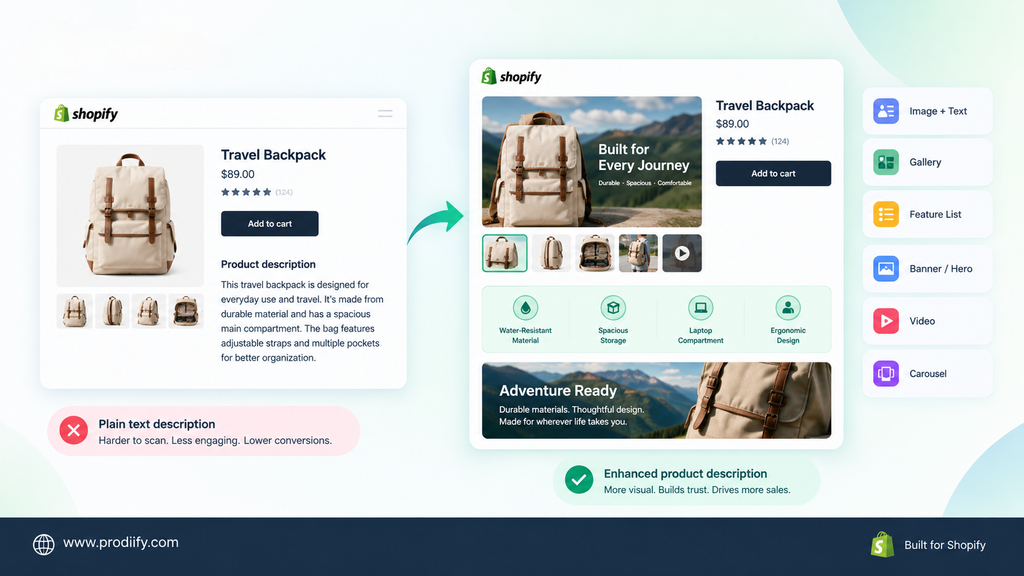
A standard Shopify product description is a single block of text, sometimes paired with a basic image gallery. An enhanced product descriptions goes further — it’s built from structured, visual sections: feature breakdowns, image galleries, comparison-style layouts, banners, and sometimes embedded video, arranged to make the product page easier to scan and more persuasive to read.
This is the same underlying idea as what Amazon calls A+ Content, but for Shopify, it usually needs to be added through a dedicated app rather than a native platform feature, since Shopify’s default product template doesn’t include it.
Why an Enhanced Product Description Outperforms Plain Text
Shoppers scan before they read. Most visitors skim a product page rather than reading every line — an enhanced product description is built for scanning, with visual hierarchy that surfaces the key points in seconds instead of requiring a shopper to read a full paragraph to find them.
It replaces claims with visual proof. “Durable” and “true to size” are claims. A feature callout with a labeled photo, or a short video showing the product in use, is proof — and proof consistently builds more confidence than text alone, especially for higher-consideration purchases.
It signals a more established brand. A product page built entirely from a single plain paragraph reads as unfinished, even when the product itself is good. An enhanced product description — with clean structure, imagery, and clear sections — signals credibility before a shopper reads a single word.
It pre-empts objections. A well-built enhanced product description can answer sizing, material, and compatibility questions directly on the page, reducing the number of shoppers who leave to search for answers elsewhere and never come back.
Why Most Shopify Stores Don’t Have This
It’s not a lack of awareness — it’s that Shopify doesn’t offer a built-in way to build an enhanced product description. Most stores end up with one of two workarounds:
- Custom theme development — a developer builds rich sections directly into the product template. Effective, but slow and expensive to set up and to change later.
- Going without — the default for most small and mid-sized Shopify stores, simply because a developer-built solution isn’t accessible or affordable for every catalog.
How to Add an Enhanced Product Descriptions to Shopify (No Developer Needed)
This is exactly the gap Prodiify’s MediaXL feature is built to close. Instead of custom theme work, MediaXL gives you six ready-made, drag-and-drop blocks you can add directly to any product page:
- Image + Text — pair a photo with a focused message
- Gallery — show multiple angles, variants, or use cases
- Feature List — break specs and benefits into a scannable layout
- Banner / Hero — highlight one key selling point in a full-width section
- Video — embed a product demo or lifestyle clip
- Carousel — rotate through multiple images or messages in a compact space
Everything is managed from the Prodiify dashboard inside Shopify admin — no theme file edits, no code, and no design team required. Every block is fully responsive by default.
A Simple Way to Build Your First Enhanced Product Descriptions
- Pick one of your best-selling products — this is where a conversion improvement has the most immediate impact
- Start with a Banner/Hero block to hook attention with your single strongest selling point
- Add an Image + Text or Feature List block to explain the details that matter most
- Add a Gallery if the product benefits from showing multiple angles or variants
- Publish and compare conversion rate on that page over the following few weeks against a similar, unchanged product
Three to four well-chosen blocks is usually enough — an enhanced product description works best when it’s scannable, not when every available block is crammed onto the page.
Enhanced Product Descriptions and SEO: Different Jobs, Same Page
It’s worth keeping these separate in your head: SEO (unique titles, descriptions, meta tags, alt text) is what helps a shopper find your page in the first place. An enhanced product descriptions is what helps convince them to buy once they’re there. A store investing in only one of the two is leaving real, measurable performance on the table — Prodiify’s AI SEO tools and MediaXL are built to work together for exactly this reason.
Conclusion
An enhanced product descriptions isn’t a cosmetic upgrade — it’s a structural change in how a shopper processes information on your page, and it consistently outperforms plain text for the products where it’s been tested. Shopify stores don’t need a developer or a full redesign to add one; starting with a handful of top-selling products through a tool like Prodiify’s MediaXL is enough to see whether it moves your numbers before rolling it out further.
Want to build your first enhanced product description without a developer? Try Prodiify free on the Shopify App Store.
FAQs- About Enhanced Product Descriptions for Shopify
1.What is an enhanced product description on Shopify?
An enhanced product description is a rich, visual version of a standard product description — built from structured sections like image galleries, feature lists, and banners, rather than a single block of text. It’s similar in concept to Amazon’s A+ Content.
2.Does Shopify have a built-in enhanced product description feature?
No. Shopify’s default product page is a plain text description and basic image gallery. Adding an enhanced product description requires either custom theme development or a dedicated app, such as Prodiify’s MediaXL.
3.Do I need a developer to add an enhanced product description to my store?
No — tools like Prodiify MediaXL are drag-and-drop, so you can build an enhanced product description directly from the app dashboard with no coding or theme file access required.
4.Will an enhanced product description actually improve my conversion rate?
Results vary by product and audience, but structured, visual content consistently outperforms plain text at building the trust and clarity that lead to a purchase. Testing it on a handful of top-selling products first gives you a store-specific read on impact.
5.Should every product on my store have an enhanced product description?
Not necessarily right away — starting with your best-selling or highest-traffic products is a practical way to test the impact before deciding whether to roll it out across your full catalog.
6.Is an enhanced product description the same thing as good SEO?
No — they solve different problems. SEO (titles, meta tags, alt text) helps a shopper find your page. An enhanced product description helps convince them to buy once they’ve arrived. Both matter, and ideally work together.