
Shopify Product Page Design- How to Make Your Store Convert Like Amazon
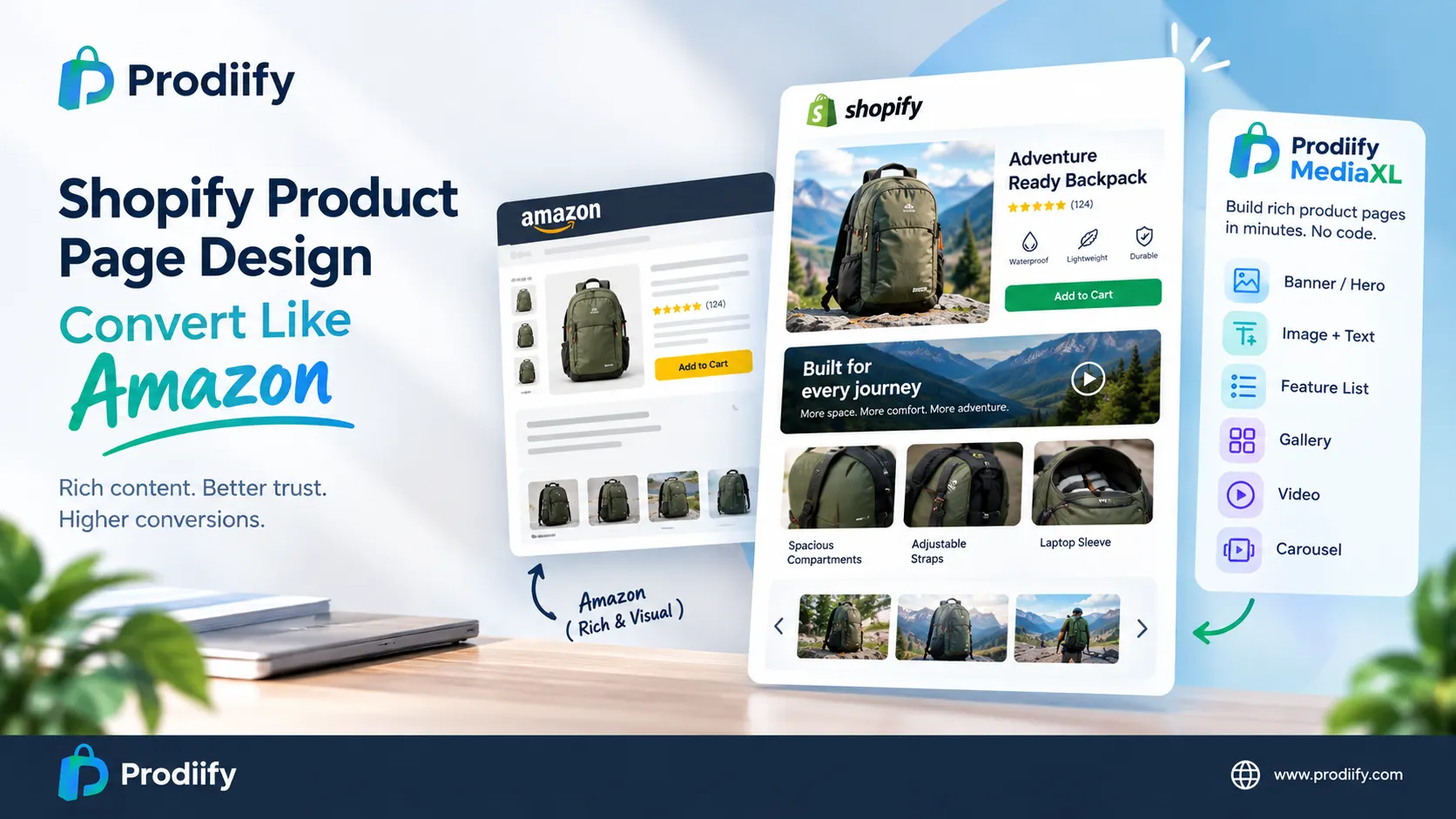
Shopify Product Page Design: Convert Like Amazon
A practical guide for brands that sell on marketplaces and want their own Shopify store to look just as trustworthy.
You spent weeks polishing your Amazon listing. The banner, the comparison graphics, the lifestyle shots: all of it is there. Then a customer lands on your own store, and the same product shows up as a block of text above a few photos.
That mismatch costs you sales. Shoppers who find you through ads, email or search expect your website to feel at least as credible as a marketplace listing. When it doesn’t, they leave, and your Shopify conversion rate quietly pays for it.
Let’s look at why this happens and how to close the gap.
Why Amazon Listings Look Richer Than Shopify Pages
Amazon gives brand-registered sellers a built-in toolkit called A+ Content. It’s a library of ready-made modules that turn a basic listing into a visual story. If the term is new to you, start with our guide on what A+ Content means for Shopify merchants.
Shopify takes a different path. The platform ships with a clean, flexible template meant to suit everything from a one-product brand to a ten-thousand-SKU catalog. That flexibility is great for launching fast, but it leaves out any native system for rich, modular product content.
So sellers go looking for a workaround. We compared the main options in our breakdown of the best Amazon A+ Content alternative for Shopify.
Where Shopify Product Page Design Usually Breaks Down
Most stores hit the same wall, and it comes down to two routes:
- Custom development. A developer builds new sections into your theme. The result can look great, but each new layout means another round of paid work, and scaling it across a large catalog gets expensive.
- Staying with the default. Without the budget or time, most merchants leave the standard template untouched. Product pages stay text-heavy, and the store ends up looking generic next to a polished marketplace listing.
Strong Shopify product page design doesn’t need a full rebuild. It needs a repeatable way to add structure, visuals and clear messaging to the pages that matter most, without waiting on a developer each time.
What Shoppers Need to See Before They Buy
Think about what a first-time visitor is really asking: What is this? Is it good? Will it work for me? Can I trust this brand? A well-built product page answers those questions fast.
Here’s the checklist we recommend for product page optimization:
- A headline benefit up top. One clear sentence on why this product is worth buying.
- Scannable features. Short, structured points beat long paragraphs. Our guide to enhanced product descriptions on Shopify walks through the format.
- Visual variety. Multiple angles, close-ups and in-use photos reduce guesswork.
- Video. Motion explains size, texture and function better than still images.
- Mobile-first layout. Most store traffic is on phones, so every section must stack cleanly.
If copywriting is what slows you down, a Shopify product description generator can produce a solid first draft you can refine in minutes.
How Rich Product Content Supports SEO and AI Search
Better pages don’t just convince visitors. They also give search engines more to work with. Content on your own domain can be crawled and indexed, which builds on the foundations in our Shopify SEO checklist and these Shopify SEO tips.
There’s a newer angle too. Shoppers now ask AI assistants for product suggestions, and those tools favor pages with clear, well-organized information. We cover this shift in how to optimize Shopify products for ChatGPT and AI search.
A Simple Layout Blueprint You Can Copy
Here is a layout that works for most catalogs. Good Shopify product page design usually follows this order:
- Hero banner with your main promise and a strong image
- Image + text section explaining the key benefit
- Feature list covering specs and differentiators
- Gallery showing detail shots and real-life use
- Video demonstrating the product in action
- Carousel for related visuals, variants or use cases
Notice how closely this mirrors the structure that already works on marketplaces. The difference is that you control it on a store you own, with your brand, your data and your customer relationship.
Build Rich Pages Without Code Using MediaXL
Prodiify MediaXL was built to make exactly this layout possible without a developer. It’s a drag-and-drop product page builder that gives you six responsive blocks: Banner/Hero, Image + Text, Feature List, Gallery, Video and Carousel. You manage everything from the Prodiify dashboard in Shopify admin, with no theme edits and no code.
MediaXL is one part of Prodiify. The other part is an AI SEO app for Shopify stores that handles titles, descriptions and meta content. Together, the text pulls shoppers in and the visual blocks help them decide.
FAQs- About Shopify Product Page Design
1.What is the best Shopify product page design for conversions?
The best Shopify product page design leads with a clear benefit, uses scannable feature lists, shows the product in multiple images and video, and works smoothly on mobile.
2.Does Shopify have a built-in A+ Content feature?
No. Shopify has no native A+ Content system. Merchants either customize their theme with code or use an app that adds rich content blocks.
3.How can I improve my Shopify product pages without a developer?
Use a no-code product page builder like Prodiify MediaXL to add hero banners, galleries, videos and feature sections with drag-and-drop blocks.
4.Will richer product pages improve my Shopify conversion rate?
Richer pages answer buyer questions earlier and build trust, which typically helps conversions. The best way to confirm is to test one product and compare it against a similar unchanged product.
5.Better Shopify Product Page Design Starts With One Product
You don’t need to overhaul your whole store. Pick one best-seller, write one strong hero message, add a feature list and a gallery, then compare its performance against similar products you haven’t touched. That small test shows you what rich content can do.
Try Prodiify MediaXL free on the Shopify App Store and build your first rich product page in minutes.
Follow Prodiify–
Get more Shopify product page ideas on X, Medium and Pinterest.